
Gift Cards


Crypto


Utility


May 8, 2026
How to Borrow Airtime on MTN, Airtel and Glo (USSD Codes) November 2026
Share post on


Running out of airtime happens to the best of us. Sometimes, it is not about how rich you are. You are just caught up in that discussion until you are disconnected. Also, you may be experiencing poor connection and unable to recharge your line. So, what’s next? It’s time to borrow airtime for that urgent call or text.
In March 2024, the Nigerian Communications Commission (NCC) approved the use of harmonized codes for all mobile network providers to perform the same actions. Whether you are a Glo, Airtel, MTN, or 9mobile user, there is a universal code to borrow airtime, buy data, or even call customer care.
In this content, I will show you how to borrow airtime from Glo, Airtel, MTN, and 9mobile in November 2026. Follow closely.
How To Borrow Airtime From All Major Networks In Nigeria.
An important directive for every network user in Nigeria is to link their NIN to their numbers or risk being disconnected. Once this is sorted, you can enjoy all major services like borrowing airtime. Here is how to get started;
How To Borrow Airtime From MTN.
MTN users can borrow airtime by using a USSD Code, the My MTN App, or by calling a customer service agent.
- Using the USSD Code
- Dial *303#
- Select the amount you want to borrow.
- Confirm this to complete the transaction.
- You will receive your borrowed airtime and notification.
- Via the My MTN App
- Sign into the My MTN App.
- Click on Borrow
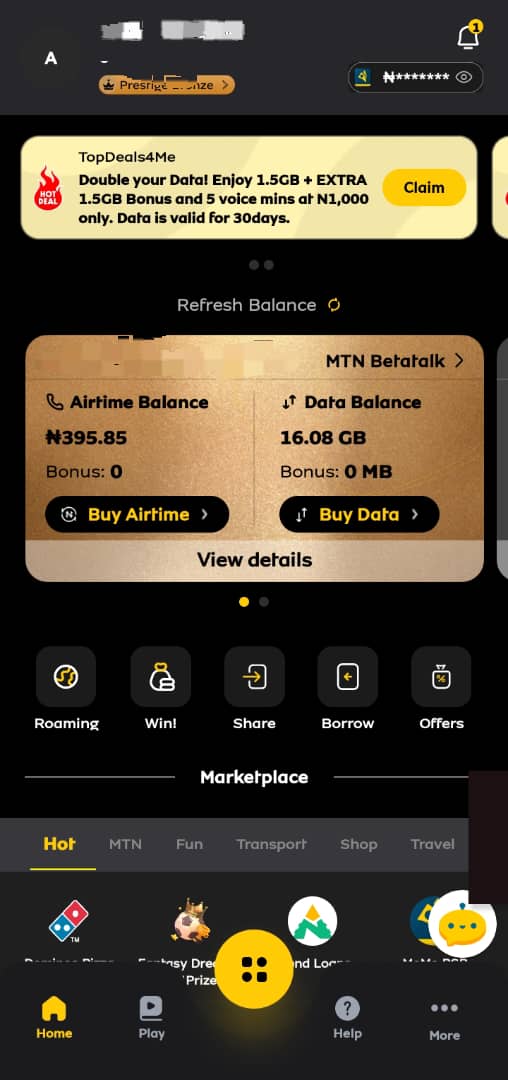
- Choose Airtime
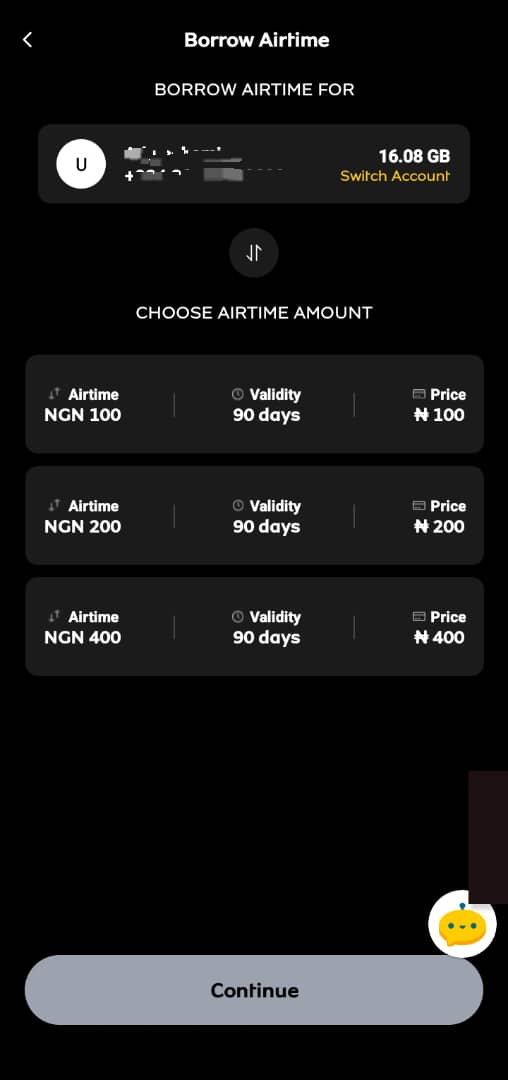
- You can choose the amount you want. However, your account activity and airtime usage history will determine your eligibility status. (To check your MTN airtime borrowing eligibility, dial *303#, select “Account,” and then “Check eligibility.” Alternatively, text “STATUS” to 303.)
- Review the accrued cost and click on Continue.
- You will be notified when the transaction is successful.
- Via Customer Support.
- Call 300 and follow the prompt.
- You can also request to speak with an agent.
How To Borrow Airtime From Airtel.
Airtel customers can borrow airtime through means similar to MTN.
- Using the USSD Code
- Dial *303#
- Select the amount you want to borrow.
- Confirm this to complete the transaction.
- You will receive your borrowed airtime and notification.
- Via the Airtel App
- Via the My Airtel App.
- Sign into the Airtel App.
- Click on Borrow Airtime.
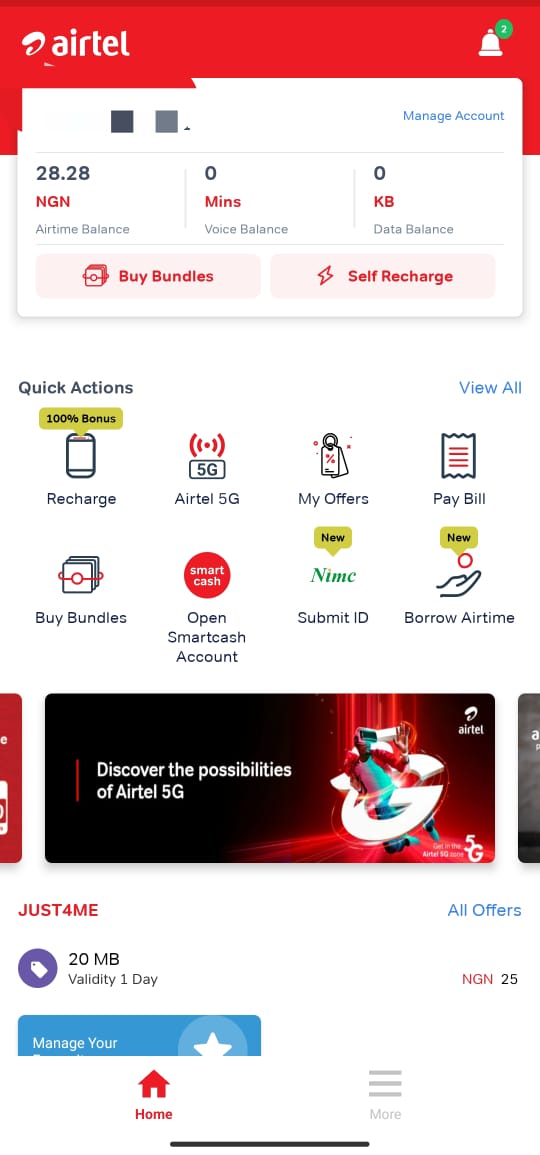
- Click on Loan Providers.
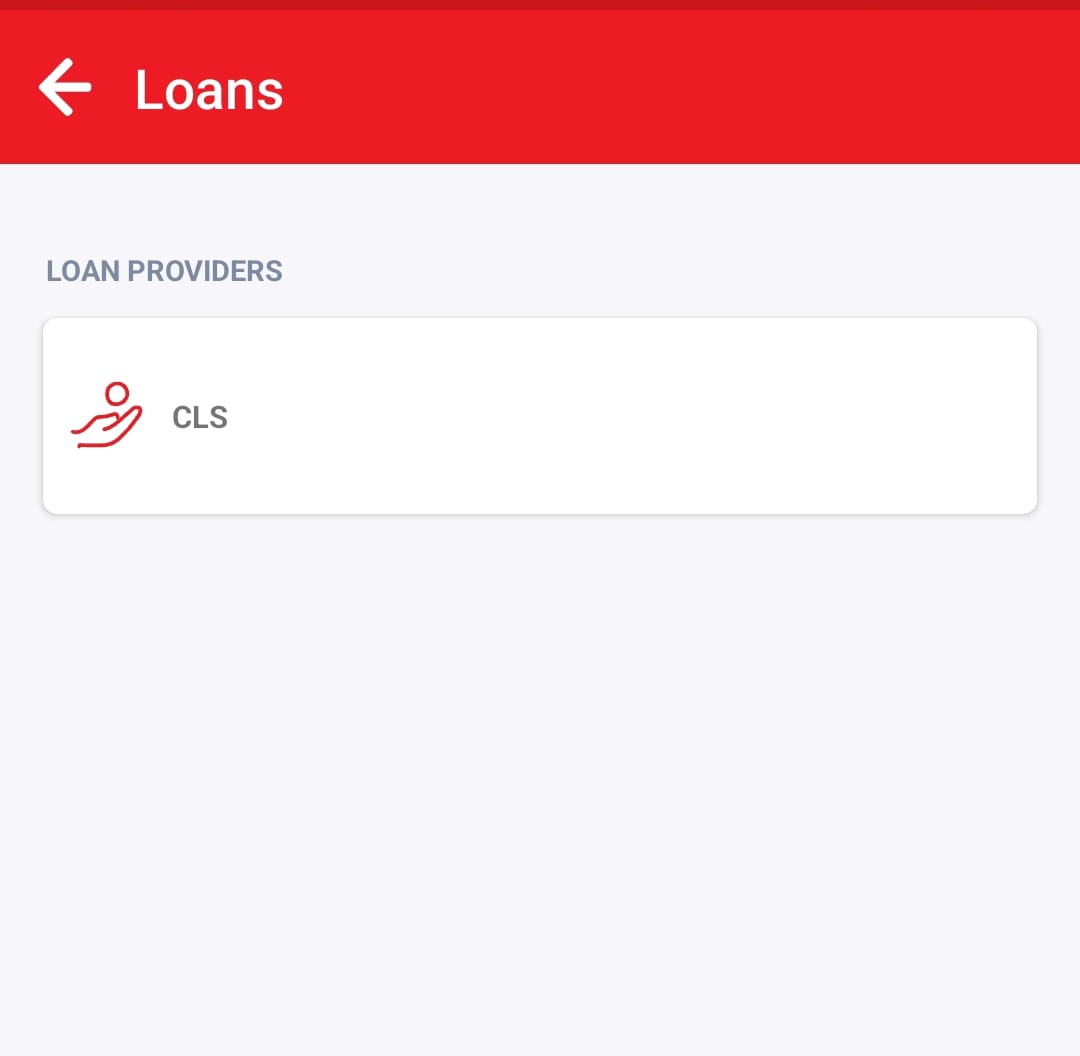
- Choose Borrow Credit, input the amount, and confirm the transaction.
- You will get a notification for the borrowed airtime.
- Via Customer Support.
- Call 300 and follow the prompt.
- You can also request to speak with an agent.
Note: Airtel prepaid customers can borrow airtime if they meet these conditions: three months of active use, ₦200 minimum monthly recharges, and no existing debt. A 15% service fee is applied to each loan.
How To Borrow Airtime From GLO.
Glo customers can borrow airtime through the USSD Code and the Glo Cafe App.
- Using the USSD Code
- Dial *303#
- Select the amount you want to borrow.
- Confirm this to complete the transaction.
- You will receive your borrowed airtime and notification.
- Via the Glo Cafe App
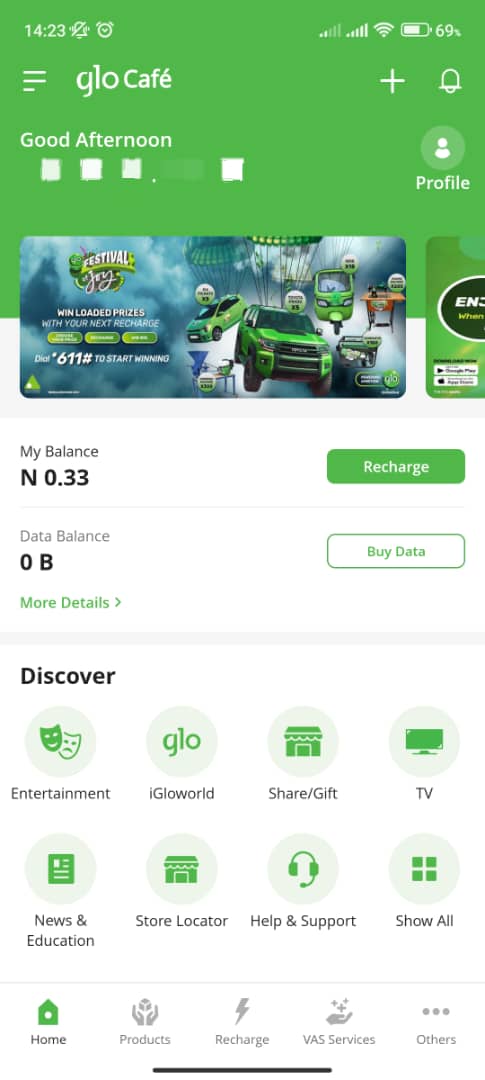
- Log into the app.
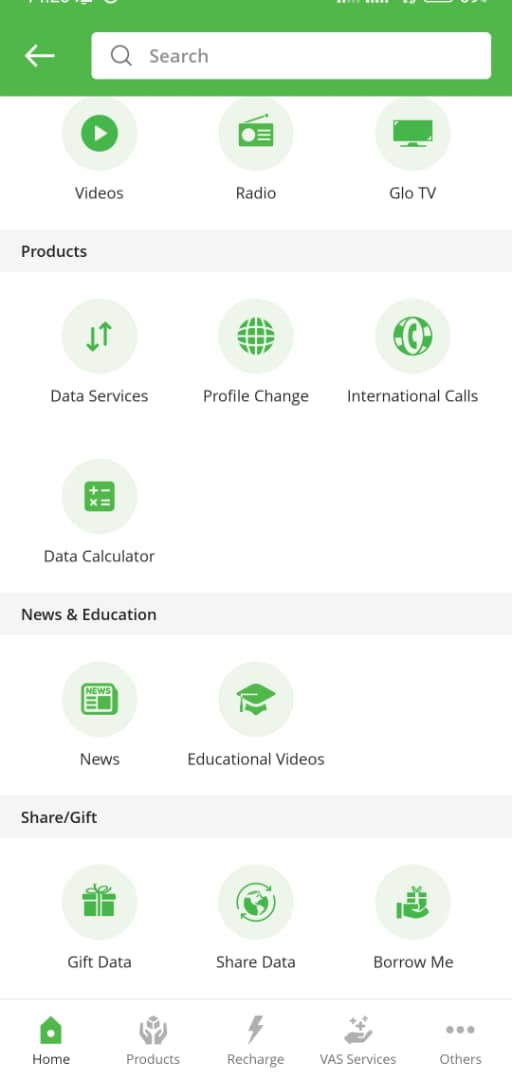
- Click on Show All.
- Click on Borrow Me.
- Choose the amount you want to borrow and subscribe to confirm the process.
- You will receive your borrowed airtime and notification.
Note: Glo customers must be active on the network for at least four months to be eligible to borrow airtime. Borrowed airtime is repaid upon the next recharge. A 15% loan fee is deducted upfront.
How To Borrow Airtime From 9Mobile.
9Mobile customers can borrow airtime via the USSD code and the 9Mobile App.
- Using the USSD Code.
- Dial *303#
- Select the amount you want to borrow.
- Confirm this to complete the transaction.
- You will receive your borrowed airtime and notification.
- Via the 9Mobile App.
- Log into the 9Mobile App.
- Click the menu icon on the dashboard.
- Select “Borrow Airtime” under the Airtime Loan section or services.
- Choose the airtime amount you wish to borrow from the available list. This is also based on your eligibility.
- Confirm the details and click on Confirm.
- You will receive a notification about your airtime.
How To Pay Back Borrowed Airtime On MTN, GLO, Airtel, And 9Mobile.
The only way to pay back your borrowed airtime on MTN, GLO, Airtel, or 9mobile is to recharge your line. With Ridima, the process is easy. You may even enjoy 2.0% off your bills. Here is how to buy airtime using the Ridima app;
Step 1: Create an account
To create an account, you can use the web platform or download the Ridima app from the Google Play Store or App Store. Once you have done this, you will need to input your details to set up your account fully. You will also need to add a bank account, which will automatically create a wallet for you. This wallet is where you will store the funds for your bill payments.
Step 2: Fund your wallet
Now that your wallet has been created, you will need to add money to it. Ridima has a unique account number where you can send money from your traditional bank account. Simply initiate a transfer to this account number, and the funds will be added to your Ridima wallet. This wallet is specifically designed for your internal transactions on the Ridima platform.
Step 3: Select the Bill Payment
The next step is to select the type of bills you want to settle. Once you click on Pay Bills, you can choose between Airtime and data.
Step 4: Choose the specific biller
Under Bill payment, select the specific biller—-MTN, Airtel, Glo, or 9Mobile—you want to fund. Ensure you choose the right one to proceed to the next level.
Step 5: Fill in the next prompts
After this, you will need to insert your mobile number. Ensure you fill in the right information, as the final stage is to finalize the transaction.
Step 6: Finalise the transaction
Review every detail before you complete the transaction. Once you have ascertained this, input your PIN to confirm the transaction.
Frequently Asked Questions About Borrowing Airtime Credit
Here are answers to some of the frequently asked questions about borrowing airtime credit;
- How Much Can I Borrow?
Your eligibility status determines how much you can borrow.
- Can I Use My Borrowed Credit To Buy Data?
Yes, you can. However, you can also borrow data directly and repay with airtime.
- Can I Borrow Airtime Credit If I Have An Outstanding Bill?
Yes. However, this depends on your eligibility status or network provider. Airtel and Glo users need to repay existing loans before they can get a new one.
- What Happens If I Don’t Repay My Airtime Loan On Time?
The consequence depends on the network provider. However, it is advisable to repay your loans to avoid extreme repercussions.
- How Can I Borrow Data On MTN, Glo, Airtel, And 9mobile?
Use *303# and follow the prompt to borrow data on any of these network providers. You can also use their apps or contact support.
- Can I Pay Back The Airtime Borrowed Even If I Have Not Used It?
Sure, you can. However, you still have to pay the 15% service charge.
Conclusion.
While borrowing airtime can be a useful temporary measure, you should avoid accumulating debt. By using the harmonized codes for Glo, Airtel, MTN, and 9mobile, you can quickly access airtime when absolutely necessary. However, use Ridima to manage your airtime and other bills proactively.
With Ridima, you can control your spending by recharging instantly, paying bills, and managing your finances effectively. Take charge of your mobile expenses and say goodbye to borrowing with Ridima – the ultimate bill payment app.
Meta Description:
Need airtime urgently? Learn how to borrow airtime on MTN, Glo, Airtel, and 9Mobile using USSD codes and apps. Simplify repayments with Ridima’s seamless bill payment feature.
Reference
https://cardtonic.com/read/borrow-airtime-glo-airtel-mtn-9mobile
https://usenosh.com/blog/borrow-airtime-9mobile
https://blog.myridima.com/how-to-plan-for-monthly-bill-payments/



Ridima is a giftcard trading platform available on Android, IOS, & Web.


For marketing and partnerships: marketing@myridima.com
support@myridima.com
© 2026 Ridima. All Rights Reserved